How to Start Learning WordPress in 2026: A Beginner’s Guide
Step 1: Understand the Foundation (WordPress.com vs. WordPress.org)
Before touching any settings, know the difference between the two flavors of WordPress:
WordPress.org (Self-Hosted): The open-source, industry standard. You have 100% control, full customization ability, and complete ownership of your site. This is what professionals use and what you should learn.
WordPress.com (Hosted Service): A fully managed platform handled for you. Easy to start, but limits customization and features unless you upgrade to high-tier plans.
Focus Area: Focus exclusively on learning WordPress.org (self-hosted).
I personally use Hostinger for my WordPress projects because it’s reliable, beginner-friendly, and offers excellent performance. From setting up websites to managing hosting, it provides the tools I need to build fast, secure, and professional websites with ease. Whether you’re launching your first website or growing an online business, Hostinger is a platform I confidently recommend based on my own experience.
Step 2: Set Up a Free Local Test Environment
You don’t need to purchase web hosting or a domain name right away. Install WordPress locally on your computer to test, practice, and learn safely without spending a dime.
Recommended Local Setup Tools
Local (by Flywheel): The most user-friendly tool for beginners. One-click WordPress installation on macOS or Windows.
XAMPP / DevKinsta: Great alternatives for running a local server environment.
Step 3: Master the Core WordPress Dashboard
Once installed, log into your admin dashboard (your-site.local/wp-admin). Spend time getting comfortable with these essential sections:
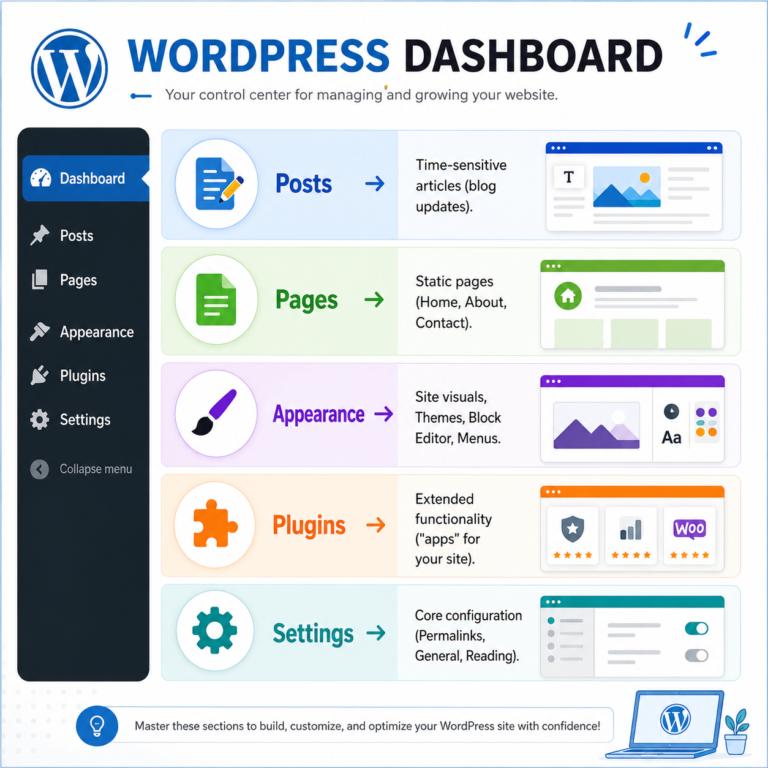
Pro Tip: Go straight to Settings → Permalinks and set the URL structure to Post name. This creates clean, search-engine-friendly URLs right out of the box.
Step 4: Choose the Right Tools (Themes & Builders)
Once you understand the basic dashboard layout, it’s time to shape how your site actually looks and functions. The secret to WordPress in 2026 is avoiding bloated, overly complex tools early on.
Start with a Lightweight Theme: Stick to fast, modern block-based themes like Astra, GeneratePress, or Kadence. They offer clean designs and fast load times out of the box.
Understand the Block Editor (Gutenberg): Modern WordPress relies heavily on site-wide block editing. Spend time building simple pages using native paragraphs, columns, headers, and media blocks before looking at third-party page builders like Elementor.
Keep Plugins Minimal: Plugins add functionality (like contact forms or SEO tools), but too many will slow down your site. Aim for 5–10 essential plugins to start.
Pro-Tip: Always preview themes on mobile devices before settling on a design. Over 60% of web traffic comes from phones!
Step 5: Build a Practical "Sandbox" Project
Reading tutorials only takes you so far—the fastest way to learn WordPress is by actually building something. Create a low-pressure test project (a “sandbox site”) where you aren’t afraid to break things.
Pick a Simple Theme Project: Build a personal portfolio, a basic 3-page business site (Home, About, Contact), or a simple blog.
Practice Essential Tasks:
- Build a custom home page using blocks.
- Set up a navigation menu and site footer.
- Create a working contact form using plugins like WPForms or Fluent Forms.
Step 6: Master Maintenance, Security & AI Tools
Building the site is only half the battle; keeping it secure, fast, and optimized is what turns a beginner into a proficient WordPress user.
Set Up Automated Backups: Install a plugin like UpdraftPlus right away. Always back up your site before updating plugins or theme files.
Essential Security & Performance:
- Use strong passwords and enable two-factor authentication (2FA).
- Install a lightweight caching plugin (like LiteSpeed Cache or WP Rocket) to optimize page loading speed.
Leverage 2026 AI Workflows: Take advantage of native WordPress AI tools and plugins to generate placeholder copy, create featured images, or write basic CSS code snippets to speed up your workflow.